Fee Calculator Services
Fee Calculator enables insurance companies to identify and include certain title, registration, and license plate fees as a part of the Private Passenger Vehicle (PPV) Valuation Request process based on information provided by the company to CCC®. If calculated, these fees will display in the Market Valuation Report (MVR) and will be listed in the Post Valuation Change Request.
Note: Fee Calculator is only available for companies that have the necessary contract with CCC®.
The information below explains the Fee Calculator information that displays in CCC® Estimating during the PPV Valuation process. For additional information regarding Fee Calculator, please reference the Fee Calculator Reference Guide.
Submit PPV Valuation Request
When submitting a PPV Valuation Request via CCC® Estimating companies that have contracted for Fee Calculator should review the following information:
Contacts Tab
The Vehicle Owner zip code +4 is required for fee calculation.
If the Vehicle Owner’s full address and 5 digit zip code is entered in the Contacts tab, the system will attempt to auto-populate the +4 zip code after the valuation request is submitted on the Total Loss Tab. If the +4 zip code is able to be auto-populated by the system, it will display within the MVR but will not display within the Contacts or Total Loss tab.
Note: The Vehicle Owner zip code +4 is not required for valuation submission. If the Vehicle Owner zip code +4 is not populated, fees will not be calculated for the valuation request.
Total Loss Tab
CCC® Estimating version 1.8.5 and higher
To use the Fee Calculator
- Create or open the workfile, click on the Total Loss tab, then click the Fee Calculator field or pencil icon. The Fee Calculator pop-up appears.

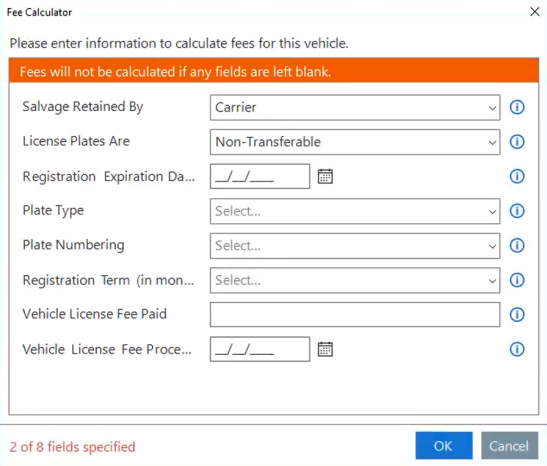
- Depending upon the vehicle selection, location selection, and company preferences, the fields that may display in the Fee Calculator pop-up include:
- Salvage Retained By
- License Plates Are
- Registration Expiration Date
- Plate Type
- Plate Numbering
- No. of Plates
- Owner Age
- Usage Type
- Veteran Status
- Registration Term (in months)
- Enrolled in Oregon
- Seating Capacity
- Curb Weight
- Gross Weight
- MSRP
- City MPG
- Combined MPG
- License Plate Number
- Wholesale Value
- Vehicle License Fee Paid
- Vehicle License Fee Processing Date
- Lien Present
- Enter the information in the fields, then click OK.
CCC® Estimating version 1.8.4
When submitting a valuation request via CCC® Estimating, you have the ability to denote the appropriate selections within the prompts:
- Registration Expires: Enter the date when the registration will expire by entering it in the field or by using the calendar function.
- License Plate Status: Select if the License Plates Are Transferable or Non-Transferable using the drop-down menu.
Note: The default value may be configured by the insurance company. In such a case, the adjuster should review and confirm the default setting is appropriate for the given claim.
- Salvage Retention: Select if the Salvage is Retained By the Carrier or Owner using the droplist menu.
Note: The default value may be configured by insurance company. In such a case, the adjuster should review and confirm the default setting is appropriate for the given claim.
During the configuration process for Fee Calculator, companies that have contracted for Fee Calculator may select fee input preset values for applicable states. These input presets will be used, if applicable, when calculating fees for valuation requests.
For additional information about the carrier-defined fee input preset values, please reference the Fee Calculator Services – Fee Input Preset Values Job Aid.
Note: Review the Market Valuation Report to view the fee details. If fee edits are needed, this can be accomplished via submitting a Post Valuation Change Request.
